


What Does Collate Mean When Printing? Simple Guide
If you’ve ever gone to print a multi-page document, you’ve likely seen the option to collate your pages. But what does collate mean when printing?
In simple terms: To collate means to print pages in the correct, sequential order for each complete document set.
This guide explains what collating does, when to use it, and how it helps keep your printed pages organized—whether you’re printing reports, worksheets, or booklets.
What “Collate” Means in Printing (Quick Answer)
Featured Snippet–Optimized Explanation
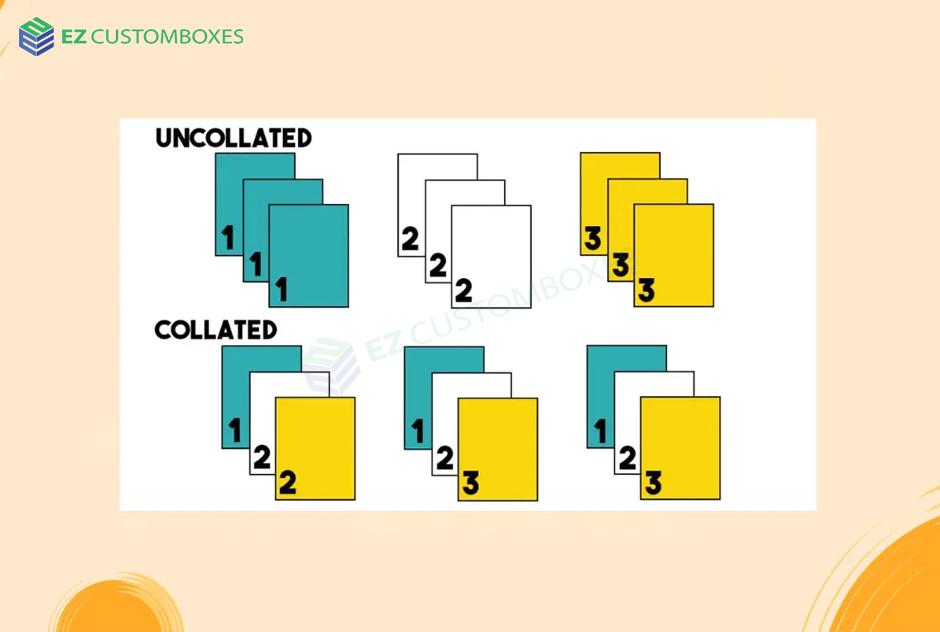
The collate meaning printing multi-page documents in order like 1, 2, 3 for each copy so each printed set is complete and ready to use.
When collate is off, the printer outputs grouped pages, like all page 1s together, then all page 2s, and so on.
Collated vs. Uncollated Printing
What Is Collated Printing?
Collated printing produces complete, ordered sets:
-
Copy 1: 1, 2, 3
-
Copy 2: 1, 2, 3
-
Copy 3: 1, 2, 3
Best for:
-
Reports
-
Packets
-
Presentations
-
Book drafts
-
School handouts
What Is Uncollated Printing?
Uncollated printing groups each page together:
-
All page 1s
-
Then all page 2s
-
Then all page 3s
Best for:
-
Flyers
-
Forms
-
Single-page documents
-
Large prints where pages are distributed individually
Why Use Collated Printing?
Collating saves time, reduces errors, and improves organization. Here’s why it matters:
-
Keeps documents in order
-
Reduces manual sorting
-
Prepares sets for binding or stapling
-
Speeds up office workflows
-
Improves print accuracy
For teams, offices, teachers, or students, collating ensures each recipient gets a complete packet.
How to Collate When Printing (Step-by-Step)
On Windows
-
Open your document
-
Select File > Print
-
Choose your printer
-
Under “Settings,” find the Collate option
-
Select Collated or Uncollated
-
Click Print
On Mac
-
Open File > Print
-
Expand the advanced menu if needed
-
Check the Collate box
-
Print your document
On Google Docs
-
Choose File > Print
-
Click More Settings
-
Enable or disable Collate
-
Print
When Should You Use Collated vs. Uncollated?
Use Collated Printing When:
-
Printing packets or multi-page documents
-
Preparing handouts for a class
-
Creating reports for a meeting
-
Printing instructions, manuals, or guidebooks
Use Uncollated Printing When:
-
Printing multiple copies of a single page
-
Producing flyers or promotional materials
-
Distributing individual pages separately
Benefits of Collated Printing
Collating offers several helpful advantages:
-
Cleaner organization
-
Faster assembly
-
Professional appearance
-
Reduced sorting time
-
More efficient office workflows
Related Terms to Understand
-
Duplex printing: Printing on both sides of a page
-
Print queue: The order of documents waiting to be printed
-
Page range: Custom selection of pages to print
-
Binding: Stapling, hole-punching, or combining pages
FAQ: What Does Collate Mean When Printing?
What does collate mean on a printer?
The collate meaning printer pages in order for each complete set of a document.
Should I print collated or uncollated?
Choose collated for multi-page packets; choose uncollated for single-page prints or flyers.
What is the difference between collated and uncollated printing?
Collated printing organizes pages into complete sets; uncollated printing groups identical pages together.
Does collate affect double-sided printing?
Yes. When combined with duplex printing, collate ensures each set stays in order front and back.
Why is my printer not collating?
Possible reasons include printer software settings, outdated drivers, or unsupported collation on basic printers.
Conclusion & Call-to-Action
Now that you know what does collate mean when printing, you can choose the right option for any project—saving time, reducing stress, and producing cleaner, more professional results.
Ready to print smarter? Try using the collate feature on your next multi-page job and experience the difference.

 Arabic
 French
 Spanish
 Portuguese
 Deutsch
 Turkish
 Dutch
Dutch
 Italiano
 Russian
 Romaian
 Portuguese (Brazil)
 Greek
Greek